Name the denominator any time you say "percent valid." The same deliverable count gets larger when the denominator shrinks. Then make two outputs: a send file of addresses you may already contact, and a CRM patch that keeps the person and stores the result.
What you are deciding
You already have rows from a campaign export, a conference scan, a waitlist, or a CRM slice. Send and import are different writes. The file is ready for neither until each stored address has a branch.
A send uses the address as a destination. A bounce, a newsletter to support@, or a disposable inbox that existed for one form are all destination problems. A CRM import uses the address as a field on a person or account. Deleting the row can drop the only key for a customer who still has a contract.
The check answers a narrow question: what did this address show at this time? It does not answer opt-in, unsubscribe, filtering, or whether the contact should remain. Keep those records where they already live, and apply them after the check.
If the file is the whole CRM, stop and export the audience for this job. Upload the email column and a stable contact id. Leave the rest of the profile where it is.
Where the short pages stop
Two pages on this site already cover pieces of the job. They do not operate the tree or the count.
How to clean an email list without losing context is the short file-prep checklist: define the audience, confirm the column, keep a record id, review categories separately, export, and write down the check date. Use it when you are about to touch the spreadsheet. This article starts after that checklist and decides what each branch means for a send and for an import.
Bulk email verification is the product workflow: upload a supported file, watch the job, filter exceptions, and export with context. Read it when you need the shape of the tool. The page does not walk a decision for every branch, and it does not show how a single "percent valid" can rise while the file stays the same.
The check order itself is on How email verification works. A later step is skipped when an earlier step already answers. The names and the credit for each name are on the results guide. Unknown versus a definite invalid finding is separated on Unknown and invalid are different decisions. What follows is the operator's tree for a file, plus one illustrative count so the denominator problem is visible.
Prepare the file so the result can come home
Make a working copy and keep the original export. Filtered sheets stop lining up with the CRM.
Give every row a stable contact id from the source system. Row numbers change when someone sorts or drops blanks. If the export has no id, add one and store the map, or the deliverable flag cannot be written back to the right person.
One cell, one address. "jane@example.com, sam@example.com" in one field is not two mailboxes. Split it, or accept a syntax failure that does not say which half was fine.
Confirm the header, the delimiter, and the encoding against a few addresses you already recognize. A one-column open usually means the delimiter is wrong. A legacy code page scrambles non-ASCII local parts, and you then verify a corrupted copy.
Upload the address and the contact id. Leave phone numbers and payment details out. Do not delete odd-looking rows before the check. That is how unknown, catch-all, and role addresses disappear with no record. Blank address cells can go. Everything else waits for a branch.
Duplicates are extra rows, not extra mailboxes
The same address shows up twice when two exports were pasted together, or when one person has two contact records. Those are different problems.
Inside one file, MailCheckup stores a duplicate address once and does not bill it twice. The second row is not a second check. Your CRM may still have two contact ids on that one stored address. Keep both ids in your map, and write the same result onto each contact. The published rule is about the address in the file, not about your contact table.
The pages checked for this article do not say whether that match is case-sensitive, whether it ignores a plus tag, or whether it folds dotted and undotted Gmail local parts together. RFC 5321 says the local part is case sensitive in the protocol, and that exploiting the difference gets in the way of interoperability. Domain names are not case sensitive. Until a product page states the match rule, keep the original spelling and join on contact id. Do not invent a collapse rule in the sheet and then treat it as the checker's rule.
The decision tree
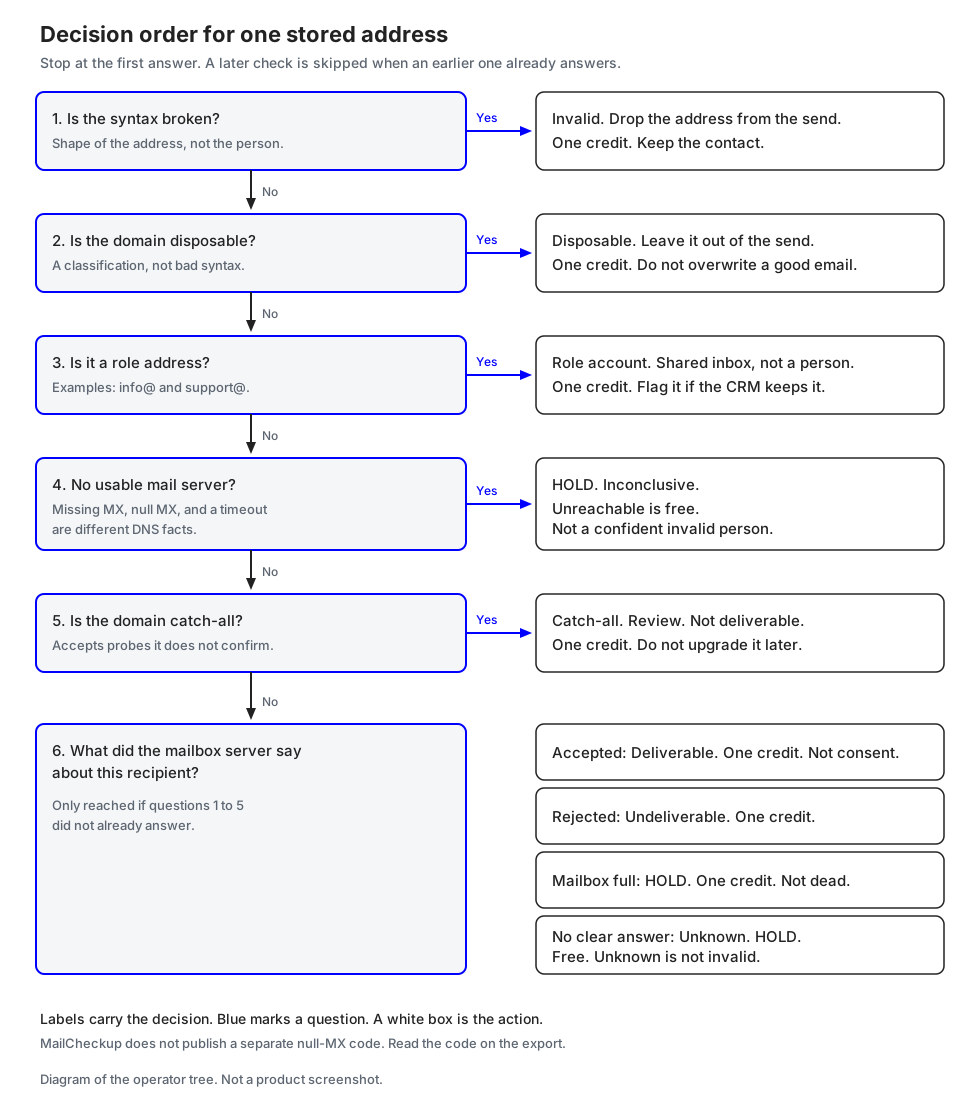
Ask these questions in order. Stop at the first one that answers. The public check sequence is the same: syntax, then disposable or role, then whether the domain can take mail, then whether a specific recipient was accepted. A classification is not broken syntax. An inconclusive result is not a dead address. The decision diagram shows this order; the text below is enough to apply it on a file.
Is the syntax broken?
Syntax is the shape of the address, not the existence of a person. RFC 5322 defines the address form used in Internet messages. A missing @, a space in the wrong place, or two addresses in one cell fail here.
On MailCheckup, broken syntax is invalid. A typo can come back as a suggestion. The submitted address is not rewritten. If the suggestion matches an address you already trust on that contact, fix the source and check the corrected value. If you are guessing, leave the customer record alone.
Invalid syntax is a finished result and costs one credit. The contact can stay. The email field stays out of the send and out of the import as a working address.
Is the domain disposable?
A disposable domain exists so someone can receive a message and throw the inbox away. The address can be syntactically fine. MailCheckup treats disposable as its own classification, not as bad syntax, and charges one credit. In a summary, disposable sits in the risky group with catch-all, role, and mailbox full. Risky is that group name. It is not a second charge.
Leave disposable addresses out of a send. Do not create a new customer from one, and do not overwrite a good email already on the contact. Store the finding. A suppressed field is enough if you need to recognize the same address on the next import.
Is it a role address?
Role addresses are shared names such as info@ or support@. The mailbox can be real. Nobody in particular owns it. MailCheckup classifies these as role accounts, not as broken syntax, and charges one credit. They are part of the risky summary, without an extra credit.
A 1:1 sequence does not belong on support@. A ticket reply might. Hold role addresses out of a newsletter or personal outreach file. On a CRM import, a role address can be the right email on a company record if you flag it as shared, so the next person does not enroll it as a person.
Is there no usable mail server?
"No MX" is not one DNS fact, and this is the branch where files get damaged by a shortcut.
RFC 1035 defines an MX record as a preference plus the name of a mail exchanger. RFC 5321 says how a sender uses it. If the domain does not exist, that is an error. A temporary DNS failure is queued and retried, not treated as a permanent death. If the MX list is empty, the domain's address record is treated as an implicit MX pointing at that host. An empty MX list does not, by itself, mean the domain refuses mail.
RFC 7505 covers the other case. A null MX is one MX at preference 0 whose exchange is ".". The domain announces that it accepts no mail, and senders must not attempt delivery. A null MX is an announcement. A missing MX is a fallback to the host address. A timeout is neither.
MailCheckup's public pages do not name a null-MX code. They do say that no mail server, or a server that cannot be reached, is inconclusive, not a confident invalid person. Mail server unreachable is free. Hold the row. Read the code on the export. If a later file uses a different code, follow that code's credit row. Do not assume a null MX and an unreachable server are the same billed event. That mapping is not published.
Is the domain catch-all?
A catch-all domain accepts recipient checks for addresses it has not individually confirmed. MailCheckup calls that catch-all and does not mark it deliverable. One credit. It is in the risky group, not as an added fee.
That acceptance does not prove the mailbox exists, and it does not prove the mailbox is fake. People work at companies that accept every probe. The limit is what the check can know.
For a send, catch-all is a review pile. A customer who just wrote to you from that address is a different risk from a purchased row you have never seen. For a CRM import, store the address with a catch-all flag and the check time. Do not write it into a field named verified valid. The next import should not upgrade a blank summary into deliverable.
Did the server accept this recipient?
If the earlier questions did not already answer, the check asks the mailbox server about this recipient.
Accept means deliverable. The server accepted the recipient during the check. That is the whole claim. Gmail's sender guidelines, checked 6 October 2026, put inbox outcomes on the sender: authentication, a Postmaster Tools spam rate below 0.3%, and RFC 5322 message format, with extra rules at 5,000 or more messages a day to personal Gmail accounts. A deliverable flag does not meet those rules.
Deliverable costs one credit. It can enter the send only when permission and suppression already say yes. A new deliverable result must not revive an unsubscribe. In the CRM, store it as accepted at check time, with the timestamp. That field is not a permission flag.
Reject means undeliverable. The public set also uses dead and invalid for rejected or unusable addresses. One credit. Leave it off the send. In the CRM, mark the email unusable and keep the contact. Do not merge this with unknown.
Mailbox full means the server cannot take more mail right now. It is not a dead address. One credit, inside the risky group, with no extra charge. Hold it out of today's send. You can recheck mailbox full later without redoing addresses that already have a result. A recheck is a new finished check, so a later chargeable answer can cost another credit. Saved results on the rest of the list stay.
Is the result unknown?
Unknown means the check did not get a clear yes or no. Greylist, a provider block, a timeout, or no clear answer land here. Retry later, greylisted, provider blocked, and system error are free on the public table. System error means the check did not finish and the hold is released. Not checked means no finished result yet, and it stays free until a chargeable result exists.
Unknown is not invalid. None of these free results is a bill. Deleting them to tighten a dashboard throws away the rows you know the least about. There is nothing to refund, because nothing was consumed.
Hold unknown out of the send. Do not move it into the invalid file. In the CRM, store the code and the time. The person remains. A later recheck of the unknown group does not rerun addresses that already have a result. A new finish that is deliverable, undeliverable, or another chargeable code can cost one credit. Unknown again is free again. The duplicate copy was never stored twice, so there is one row to recheck even if several contact ids point at it.
Two outputs from one tree
| Branch | Send file | CRM import |
|---|---|---|
| Syntax invalid | Omit the address | Do not write it as a working email; keep the contact |
| Disposable | Omit | Do not create a customer from it; do not overwrite a good email |
| Role | Omit from 1:1 and newsletters | Allowed on a company record if you flag it as shared |
| No usable mail server | Hold | Hold; do not mark the person invalid |
| Catch-all | Review by source and history | Store with a catch-all flag, not as deliverable |
| Deliverable | Include only if permission and suppression already allow | Store as accepted at check time, with the timestamp |
| Undeliverable | Omit | Mark the email unusable; keep the contact |
| Mailbox full | Hold for this send | Keep; recheck later if you need a newer answer |
| Unknown, greylist, block, timeout | Hold | Store the code; do not relabel it invalid |
Apply suppression after this table. Permission lives in the sending platform. The check does not grant it and does not cancel it.
If you only have time for one review, review the exceptions. Syntax, disposable, undeliverable, and role are usually a written policy. Catch-all, mailbox full, unreachable, and unknown need a rule you can repeat next week. Put that rule on the campaign or import ticket.
How credits work on a file
Charge one credit for a finished result of valid, deliverable, undeliverable, dead, invalid, disposable, catch-all, role account, or mailbox full. Charge nothing for unknown, retry later, greylisted, mail server unreachable, provider blocked, or system error. Those free results are not invalid. Risky names the disposable, catch-all, role, and mailbox-full group. It does not add a credit.
Duplicates inside one file are stored once and are not billed twice. You pay when the answer is finished. A hold on a check that never finishes is released. Consumed credits are not refunded. Extra addresses join a list that is already running. Do not open a second list for that. Removing, clearing, or deleting is refused while importing or verifying. Stop first.
A recheck of one group can use another credit because it is a new finished check. The rest of the saved results stay. Unknown or mailbox full can be rechecked without redoing addresses that already have a result.
This article does not quote plan prices. The billing unit in the example is the credit rule above.
An illustrative file of 1,000 rows
This section is an illustration. The file and the result mix are invented so you can check the arithmetic by hand. It is not a customer list, a benchmark, or a live test. The sample checker on the marketing site does not contact mail servers.
Assumptions
- The working file has a header, which is not a data row, and 1,000 data rows.
- Each data row has a contact id and one address cell.
- 80 of those rows repeat an address that already appears earlier in the same file. Unique addresses stored: 920.
- Of those 80 extra copies, 50 repeat a deliverable address, 20 repeat an undeliverable address, and 10 repeat an address whose unique result is unknown. That split is also an assumption, so a row-level count can be compared with a unique-address count.
- Every unique address finishes. In this illustration there is no "not checked" row and no system error.
- The 920 finished results are assigned as follows, and only as follows.
| Branch in the tree | Public result used here | Unique addresses | Credit each | Credits |
|---|---|---|---|---|
| Syntax broken | invalid | 40 | 1 | 40 |
| Disposable | disposable | 55 | 1 | 55 |
| Role | role account | 30 | 1 | 30 |
| No usable mail server | mail server unreachable | 25 | 0 | 0 |
| Recipient rejected | undeliverable | 70 | 1 | 70 |
| Catch-all | catch-all | 110 | 1 | 110 |
| Mailbox full | mailbox full | 15 | 1 | 15 |
| Recipient accepted | deliverable | 500 | 1 | 500 |
| No clear answer | unknown | 60 | 0 | 0 |
| Deferred check | greylisted | 10 | 0 | 0 |
| Blocked check | provider blocked | 5 | 0 | 0 |
| Total | 920 | 820 |
40+55+30+25+70+110+15+500+60+10+5 = 920. The free rows are 25+60+10+5 = 100. Chargeable rows are 920−100 = 820, which matches the credit column. The risky summary is disposable + catch-all + role + mailbox full = 55+110+30+15 = 210. Those 210 credits are already inside the 820. You do not add 210 again.
Duplicates stored once
The file has 1,000 data rows. The check stores 920 addresses. The 80 copies are not a second check and not a second credit. If you budgeted one credit per spreadsheet row, you set aside 1,000. The finished charge in this illustration is 820.
The gap is 180 credits. It has three parts, and only three:
- 80 duplicate copies, not stored again
- 75 free inconclusive answers that an operator would call the unknown pile: 60 unknown + 10 greylisted + 5 provider blocked
- 25 unreachable mail servers, also free
80+75+25 = 180. 1,000−180 = 820. Unknown is not billed. The unreachable branch is not billed either. Putting either pile into an "invalid" export does not create a refund, because there was no charge to reverse. It does create a false suppression list.
A later recheck of those 60 unknown addresses is a new check, still on this invented file, not a second study. If 40 come back deliverable and 20 stay unknown, the 40 can cost one credit each and the 20 cost nothing. The other saved results are not redone. The original 820 credits stay consumed. Consumed credits after that what-if: 860.
Why "percent valid" lies
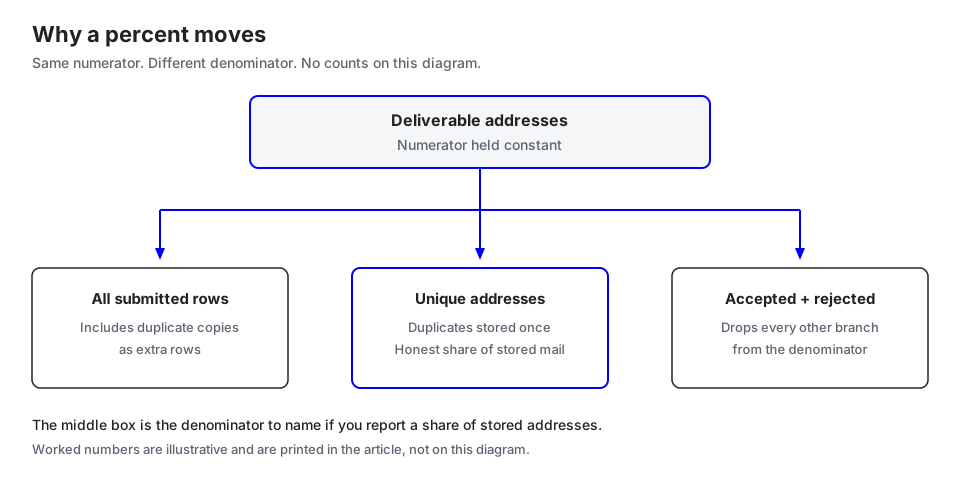
Hold the deliverable count still at 500. Change only the denominator.
| What someone divides by | Fraction | Percent, one decimal | What it hides |
|---|---|---|---|
| All 1,000 submitted rows | 500/1000 | 50.0% | Counts duplicate copies as extra people in the denominator |
| 920 unique stored addresses | 500/920 | 54.3% | This is the honest "share of stored addresses that were accepted" |
| Unique addresses after dropping the 75-address unknown pile | 500/845 | 59.2% | Those 75 did not become deliverable; they left the denominator |
| Unique addresses after also dropping 25 unreachable | 500/820 | 61.0% | 820 is a credit count, not a headcount of good mailboxes |
| Deliverable plus undeliverable only | 500/570 | 87.7% | Drops 350 unique addresses from view |
| Deliverable plus catch-all, over unique | 610/920 | 66.3% | Treats catch-all as accepted recipients, which the result does not say |
500/920 is 54.347…%, shown as 54.3%. 500/570 is 87.719…%, shown as 87.7%. That jump is not rounding. The 87.7% denominator keeps 570 addresses and ignores 350: syntax 40, disposable 55, role 30, unreachable 25, catch-all 110, mailbox full 15, and the 75-address unknown pile. 40+55+30+25+110+15+75 = 350, and 920−350 = 570. Someone can say "we're 87.7% valid" while more than a third of the stored addresses never entered the fraction.
Row counts move the same way. Under the duplicate assumption, the sheet has 550 deliverable rows (500+50) and 90 undeliverable rows (70+20). 550/1000 is 55.0%. 550/640 is 85.9%. Same invented file. The mailbox did not change. The fraction did.
Say the denominator in the same sentence: "500 of 920 unique addresses were deliverable. The file had 1,000 data rows, and 80 duplicate copies were stored once. 100 unique addresses finished with no credit." Deleting unknown rows to raise the percent does not add a deliverable address. The numerator stays put. The report gets smaller.
What still fails after the file looks tidy
Wrong column. If the header says email and the values are phone numbers, every branch after that is noise. Spot-check addresses you already know before you trust a total.
Encoding. A broken local part becomes syntax-invalid. Compare the working copy with the original export before you suppress a pile of "invalid" rows.
Second list. A running list can take more addresses, and they join the same run. A second list splits the audit.
Delete during the run. Removing, clearing, or deleting is refused while importing or verifying. Stop first. Starting over because the button was disabled is how half-finished counts begin.
Consent overwrite. When the CRM update runs, protect unsubscribe, complaint, and do-not-email fields. A verification column updates a verification column.
Boolean collapse. If the warehouse maps every code other than invalid to "safe," catch-all, role, mailbox full, and unknown become deliverable. Keep the original code and derive the send file from the table above.
Immediate retries. Unknown, greylist, and unreachable often mean the receiving side did not answer. Recheck that group later. A new credit applies only when the new finish is chargeable. Do not compare your unknown count with the marketing site's sample checker. That sample does not contact mail servers.
Export, join, and date the check
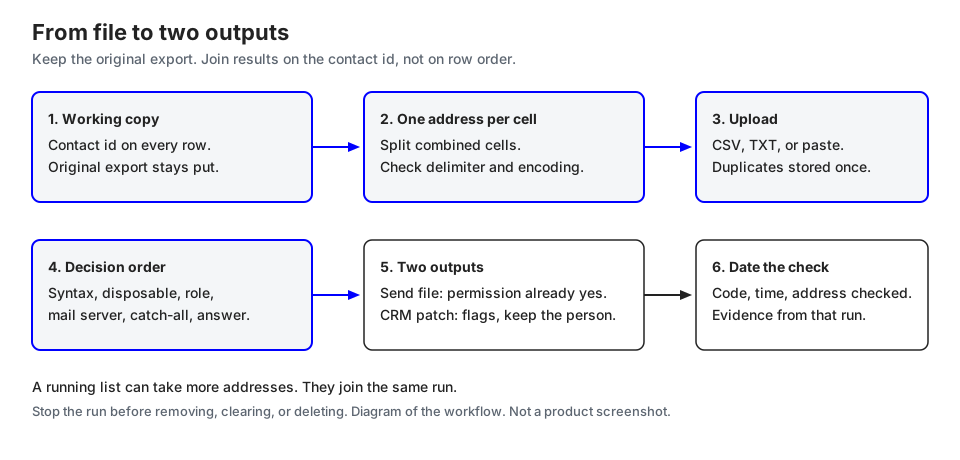
Export CSV, TXT, or XLS when the run has finished. Queued work and not-checked rows stay visible as unfinished. A quiet zero in the invalid column is the wrong place for them.
Join on the contact id. Write back the result code, the check time, and the address that was checked. If three contacts shared one stored address, write the same code onto all three and note that the charge was one address.
One file goes to the send platform, already cut by permission. One file goes to the CRM, with flags, and with undeliverable marked unusable rather than deleted. Keep the working copy. Date the campaign or the import. A result is evidence from that check. Verify again before a high-stakes send when the list is old. Last quarter's deliverable flag is not a permanent certificate.
Key takeaways
- Sort each stored address with one tree: syntax, disposable, role, no usable mail server, catch-all, deliverable, unknown. Stop at the first answer. Undeliverable and mailbox full sit beside deliverable as recipient answers, not as synonyms for unknown.
- Produce a send file and a CRM patch. They do not contain the same rows.
- Duplicates inside one file are stored once and billed once. Unknown, greylist, a blocked check, an unreachable server, and a system error are free. Free does not mean invalid.
- Deliverable means the server accepted the recipient at check time. It is not inbox placement and not consent.
- If you report a percentage, say the denominator in the same sentence. 500 deliverable addresses can be 50.0%, 54.3%, or 87.7% in the illustration above, depending only on what you divide by.
Questions that come up with the file open
Should I delete every row that is not deliverable?
No. Blank address cells can go. Syntax-invalid, undeliverable, and disposable addresses stay off the send. Role, catch-all, mailbox full, unreachable, and unknown follow the table. The CRM contact can outlive a bad email field.
Why did our "percent valid" jump after we removed unknowns?
The numerator stayed put. Unknown rows left the denominator, so the percent rose. In the illustration, dropping the 75-address unknown pile moves 500/920 (54.3%) to 500/845 (59.2%) without a single new deliverable address. Put the unknown rows back in the report, labeled unknown.
Do I pay for the duplicate rows and the unknown rows?
Not under the published rules. Duplicates in one file are stored once. Unknown is free. The illustration turns 1,000 data rows into 920 stored addresses and 820 credits. On a real file, credits consumed should equal finished chargeable results after that collapse, with the free codes excluded. Your counts will differ.
Can I add the stragglers as a second list?
Add them to the list that is already running. They join that run. A second list is a different job. If you need to remove rows, stop the run first. Deleting is refused while importing or verifying.
Run the check on the working copy
When the working copy has a contact id, one address per cell, and a written rule for catch-all and unknown, upload that file in the MailCheckup app at cp.mailcheckup.net. Read the export with the tree above. Keep the denominator next to any percentage you send to a teammate.
The marketing site does not run that check. Its sample checker does not contact mail servers. The 1,000-row count above is illustrative and uses only the credit rules stated in this article.
Sources
These are the documents this article relied on. Access date for each: 6 October 2026.
- RFC 5321, Simple Mail Transfer Protocol, section 5.1 (MX lookup, implicit MX when the MX list is empty, nonexistent domain as an error, temporary DNS failure retried) and the local-part case note in section 2.4. https://www.rfc-editor.org/rfc/rfc5321
- RFC 5322, Internet Message Format, address syntax. https://www.rfc-editor.org/rfc/rfc5322
- RFC 1035, Domain names, MX record format. https://www.rfc-editor.org/rfc/rfc1035
- RFC 7505, Null MX. A single MX of preference 0 with exchange "." means the domain accepts no mail, and senders must not attempt delivery. https://www.rfc-editor.org/rfc/rfc7505
- Gmail, Email sender guidelines. Requirements for sending to personal Gmail accounts include SPF or DKIM, a Postmaster Tools spam rate below 0.3%, and RFC 5322 message format; senders of 5,000 or more messages a day have additional authentication and one-click unsubscribe requirements. The page does not say a third-party deliverable flag meets those rules. https://support.google.com/mail/answer/81126
- MailCheckup public product copy used for check order, result names, and credits: the how-it-works page, the results guide, and the pricing and list behavior recorded in the product truth registry checked 6 October 2026. No live list was processed for the numerical example.