Key takeaways
- Verification sorts technical evidence. Permission, suppression, and complaint history stay in your sending system and win every conflict.
- Write down three counts before anyone talks about a clean rate: raw rows, rows that contain an address, and unique addresses.
- Broken syntax and a rejected recipient leave this send. Unknown, greylisting, an unreachable mail server, and a blocked check do not mean the person is invalid.
- Catch-all, role, disposable, and mailbox-full results are classifications. Each one needs a campaign policy, not a silent delete.
- Measure later bounces and complaints on the segment you actually mailed. Do not grade the check by inbox placement.
What decision are you making?
You already decided who is allowed to receive this campaign. Verification asks a narrower question of that audience: which addresses showed a technical problem, which servers accepted the recipient, and which checks returned no clear answer. A purchased list is the wrong input, because a deliverable result would still leave you without permission. A stale export of people who opted in is the right kind of input. A row with no permission stays out of the send even when the server says yes.
What an email verification check covers names the layers: shape, domain, mailbox response, and risk flags. The email verification page states the boundary in brief. A result is evidence at a point in time. It is not identity, consent, or an inbox promise. Use those pages for definitions. Use the checklist when the export is on your desk. Store the check time with the segment. The answer to "why was this row held?" is the date, the result, and the rule, not a remembered percentage.
Which properties get confused?
Valid, verified, clean, deliverable, and safe to send get used as if they were one field. Six properties sit on a row. A verification check can speak to the first three. It cannot settle the last three.
Syntax is only the shape
RFC 5322 section 3.4.1 defines an addr-spec as a local-part, an @ sign, and a domain. The local-part is a dot-atom or a quoted string. A string that matches can be discussed as an email address. A mailbox, a mail-enabled domain, and permission to write are separate facts.
A trailing space, a domain wrapped onto the next line, or an address split across two columns is file damage. Repair that before you pay for a recipient check. After the file is intact, a real syntax failure stays out of this send, and the original string stays on the record for a person to read.
A mail exchanger is not a person
RFC 1035 section 3.3.9 defines an MX record as a preference plus a host willing to exchange mail for the domain. Lower values are preferred. The record names a host.
RFC 7505 lets a domain publish a single MX with preference 0 and exchange "." to say it accepts no mail. That null MX is a domain statement, not a finding about one local-part, and it is different from a temporary DNS failure. The same RFC describes the older fallback: with no MX, senders may try A or AAAA addresses. So a missing MX is not itself a declaration that mail is refused. A null MX is that declaration. An unreachable server during your check is a third case: the conversation did not finish. Drop null-MX rows from this send. Hold unreachable rows.
Acceptance is a reply at one moment
RFC 5321 section 4.1.1.3 says that an accepted RCPT returns 250 and stores the forward-path. Section 4.2.1 defines the first digit. A 2yz reply means the action completed. A 4yz reply is temporary, and the action may be requested again. A 5yz reply means the client should not repeat that exact request. The RFC also notes that some conditions called permanent can still be corrected later by a person. Section 2.1 adds that an MX host is often a relay, not the final delivery system. Accepting the relay task is not the same event as placing a message in an inbox later.
If the domain accepts every recipient, a 250 does not identify one mailbox. Keep catch-all rows in Review. Greylisting is an operator habit on top of 4yz replies. RFC 5321 does not define the word. What it supports is a temporary refusal that may be tried again, and an immediate repeat that can meet the same refusal. Hold those rows.
Inbox placement is a sending outcome
Google's email sender guidelines govern mail you send to Gmail. All senders are told to use SPF or DKIM, valid forward and reverse DNS, TLS, RFC 5322 formatting, and a Postmaster Tools spam rate below 0.3%. Senders of more than 5,000 messages a day are also told to use SPF and DKIM, publish DMARC, align the From domain on direct mail, and support one-click unsubscribe on marketing and subscribed messages, with a visible unsubscribe link in the body.
Those rules cover your identity, your servers, and complaints about mail you sent. They do not detect a subscriber's mailbox. A careful Send segment can still miss the inbox. A correct SPF record cannot revive an address the recipient server rejected. Keep authentication in the sending tool. SPF, DKIM, and DMARC authenticate you. They do not prove a recipient.
Engagement and consent sit outside the check
Opens, clicks, replies, and purchases help you judge a catch-all or role row. The mail server does not return them. A quiet subscriber can have a working mailbox. A recent opener can have a full one today.
Consent is the source, the wording, the date, and any later unsubscribe or complaint. The check neither creates that record nor deletes it. When the unsubscribe file and a deliverable result disagree, the unsubscribe wins. A "valid only" export that overwrites the audience is a quiet resubscribe.
What a messy list looks like on arrival
The file usually shows up because a send date exists, not because anyone designed an audience. Several defects arrive together. More than one column could be the email. A spreadsheet has wrapped a domain onto the next line, or a salesperson pasted an address into notes. There is no stable contact id, so sorting the sheet destroys the only row number you had. Two CRM records share an address. Permission is a sentence in the export email ("these are customers") rather than a column. Unsubscribes live in the sending platform and are not in the file. Role addresses and disposable domains sit in the same column as personal inboxes.
The request attached to that file is often one number: what percent is clean. That number moves when you drop blanks, collapse duplicates, or delete unknown rows. None of those moves answers who may be mailed. The worked example later in this guide shows the same arrival shape with illustrative counts, so the checklist below has something concrete to operate on.
The operating checklist
Use this checklist for one campaign file. It is a procedure, not a score. Check a box only when the artifact exists: a saved count, a joined file, a segment, or a named owner.
Before you upload
- Name the campaign, the planned send date, and the person who may approve exceptions.
- Export the audience your permission rules already allow. Do not export the full database to see what verifies.
- Add or keep a stable contact id before any sort, filter, or dedupe. Store it in the working copy.
- Choose one email column and write the header name in the campaign note.
- Remove phone numbers, postal addresses, payment notes, and free-text comments. They do not help a mailbox check.
- Join unsubscribes, complaints, and any hold you already trust. Mark those rows "do not mail" and keep them in the file.
- Save the original export. Work in a copy.
- Repair file structure only, such as a leading space. Do not guess a new domain.
- Record raw rows, rows with an email, and unique addresses. If you fold case, say so. Do not invent a folding rule mid-campaign.
- Set aside blank email cells. They were never checked, so they are not unknown results.
While the check runs
- Use one list for this file. Add late addresses to that run instead of opening a second list.
- While the list is importing or verifying, do not remove, clear, or delete it. Stop the run first.
- Treat "not checked" as unfinished. It is not a reason to mail.
- A sample report on the marketing site does not contact mail servers. Decide from a completed check in the app.
When you turn results into segments
- Compare totals to unique addresses checked, not to raw spreadsheet rows.
- Open a handful of rows in every category before you write a rule. Confirm the reason, not only the label.
- Build these segments, and no blended "clean" tab:
- Send. The check accepted the recipient, the row has permission, and no suppression flag is set. - Do not mail. Unsubscribe, complaint, missing permission, or an existing hold. This segment overrides a deliverable result. - Suppress from this send. The address was rejected, or the syntax is broken. Keep the CRM record and the submitted string. - Review. Catch-all, role account, or disposable. Apply the written policy for this campaign. Do not hide the rows inside Send. - Hold. Unknown, greylist, retry, unreachable mail server, provider block, mailbox full, system error, or not checked. No delete.
- Store a typo suggestion in its own column. Leave the submitted address unchanged unless a person confirms the edit.
- On a later pass, recheck inconclusive or temporary groups such as unknown and mailbox full. Leave finished acceptances and rejections in place.
- Dedupe in the sending platform. A checker that stores one copy of a repeated address has not merged two contact records. Apply the same segment to each source row.
- Write a one-page handoff: check time, intake counts, segment counts, rows held, and the exception owner.
The day you send
- Rebuild the send file as the intersection of the Send segment and the suppression list as of that morning.
- If the check is old relative to how fast this list changes, repeat the Hold group. No fixed number of days keeps a result true.
- Confirm SPF, DKIM, DMARC, and the unsubscribe path in the sending tool. Those controls are outside the verification result.
After the campaign
- Record bounces and complaints against the segment you mailed, with the send date and the check date.
- Do not treat inbox placement as a verdict on the checker. Placement also depends on authentication, complaints, content, and recipient filters.
- If unknown results jump on the next review, read blocked, timeout, and DNS reasons before you treat the audience as lost.
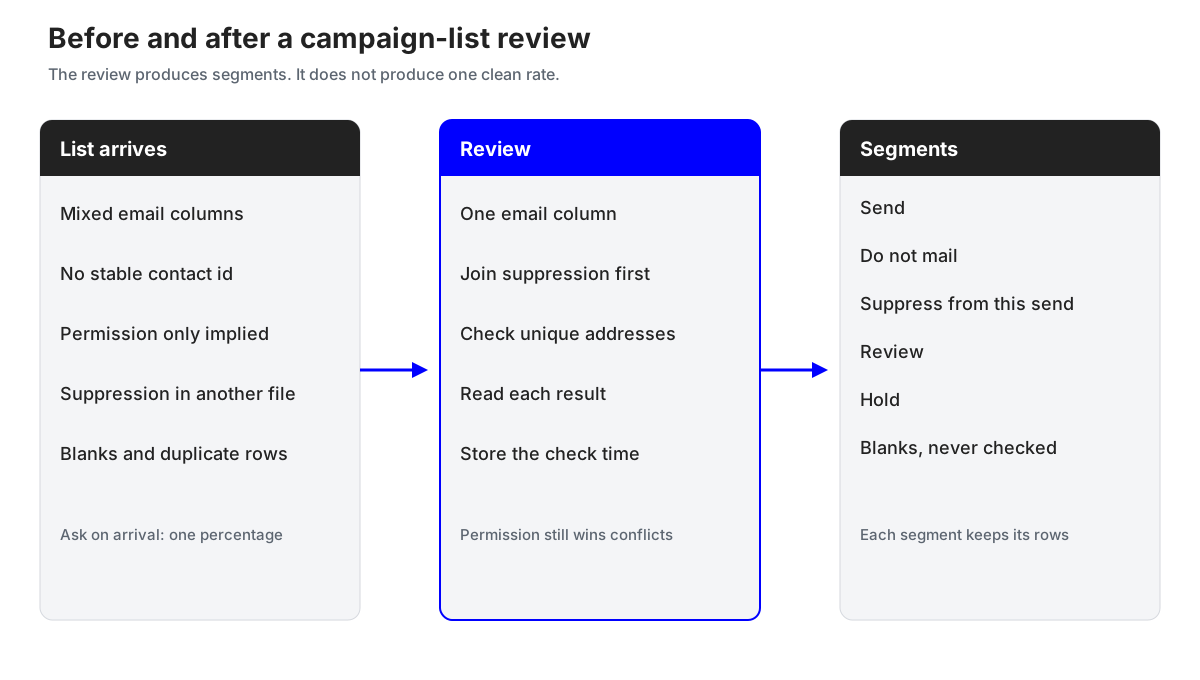
The diagram keeps arrival, review, and segments apart. A send owner should accept the segments, not a single percentage.
A before-and-after: one file becomes segments
The figures in this section are illustrative. They are not a customer story, not a MailCheckup test, and not a benchmark. They exist so you can see how intake counts, check counts, and permission counts refuse to share one denominator. Replace every number with your own file.
The file that arrived
A reactivation file lands with 2,400 rows. The columns are email, first name, source, and a last-open date. There is no contact id. There is no permission column. A separate unsubscribe export holds 180 addresses and was not joined. Ninety email cells are blank. Sixty addresses appear on two rows each. Several dozen local-parts are role names such as info, sales, or support. The request attached to the file is "tell me if it is clean enough to send."
"Clean enough" names no owner, no segment, and no rule for the unsubscribe file.
The counts you write down first
Illustrative intake math, before any mailbox check:
| Count | Illustrative value | What it is |
|---|---|---|
| Raw rows | 2,400 | Everything in the export |
| Blank email cells | 90 | Removed from the check, kept in the archive |
| Extra duplicate rows | 60 | Same address on a second row |
| Unique addresses to check | 2,250 | 2,400 minus 90 blanks minus 60 extra copies |
The 60 extra rows stay as a join. Both source rows inherit the address result, and the send still goes out once. Paste a contact id into the working copy before you sort. Leave the original export untouched. Flag the 180 unsubscribe addresses. Do not delete them. The overlap with the 2,250 is unknown until the join runs, and the flag has to survive the check.
The illustrative results
Assume the 2,250 unique addresses finish as follows. Again, these numbers are a teaching sketch. Your file will not match them.
| Result on the unique address | Illustrative count | First segment, before permission |
|---|---|---|
| Accepted recipient (deliverable) | 1,620 | Candidate for Send, then permission |
| Rejected or broken syntax | 180 | Suppress from this send |
| Disposable | 40 | Review |
| Role account | 55 | Review |
| Catch-all | 140 | Review |
| Mailbox full | 25 | Hold |
| Unknown, including greylist, unreachable, blocked | 190 | Hold |
The result rows sum to 2,250. If your real report does not sum to the unique addresses you submitted, reconcile before you build a send. A missing group is usually unfinished checks, a hidden filter, or a denominator mixed with raw rows.
The segments you hand off
Permission is applied after the technical result, and it only removes people from Send. It does not move a rejected address into Send. In this sketch, 70 of the 1,620 accepted addresses match the unsubscribe file, and 30 have no permission record you can point to. Both groups go to Do not mail.
| Segment | Illustrative rows (unique addresses) | Rule used |
|---|---|---|
| Send | 1,520 | Accepted, permission present, not suppressed (1,620 minus 70 minus 30) |
| Do not mail | 100 | Unsubscribe or missing permission, even though the server accepted the recipient |
| Suppress from this send | 180 | Rejected or broken syntax; record kept |
| Review | 235 | Disposable 40, role 55, catch-all 140 |
| Hold | 215 | Mailbox full 25 plus unknown 190 |
| Not checked, blanks | 90 | Never submitted; still in the archive |
The Send count is not 1,620, and it is not "2,400 times a clean rate." It is the accepted set minus the permission failures. The 100 do-not-mail rows are the point of the exercise. A team that exports only "valid" addresses and imports them over the suppression list will mail people who already left.
Write the Review rules before the file arrives. For this reactivation sketch, disposable addresses stay out unless a named relationship justifies an exception. Role addresses stay out of a personal note and can be a separate decision only when the message was always meant for a published company inbox. Catch-all rows stay out of default Send. Add one back only with evidence that does not depend on the probe: a contract, a recent reply, or a purchase on that address.
Hold is a scheduled second pass, not a soft delete. Mailbox full can clear. A greylist, a block, or an unreachable server can answer later. Leaving a row unsent is a smaller error than deleting a customer the check could not see.
Duplicate source rows inherit the segment. If both are permissioned and the address is in Send, the sending platform still emits one message. Note the duplicate count so the CRM owner updates both records.
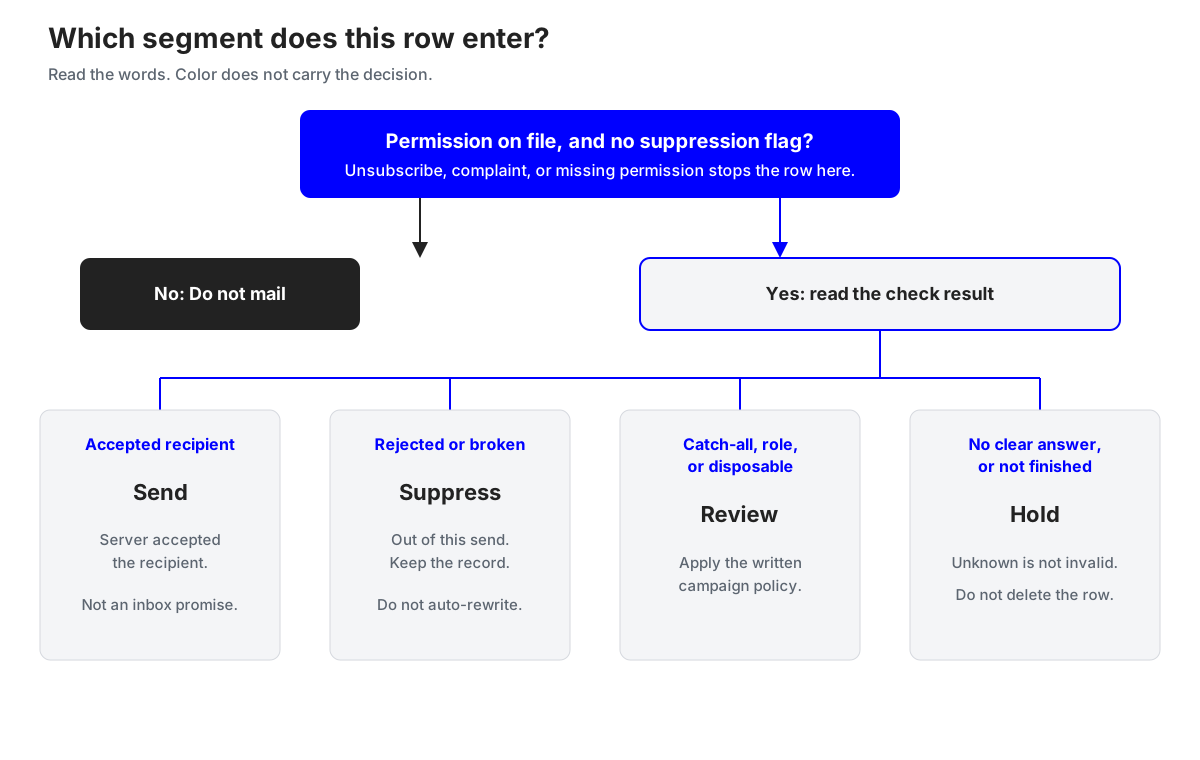
Read the flow from the top. Permission and suppression are the first gate. Result labels choose among Send, Suppress, Review, and Hold only for rows that are still allowed to be considered. Unknown never falls through to Suppress.
How each result becomes a segment
The labels below follow the public MailCheckup result set so a marketer and a later import use the same words. The results guide is the reference for meaning and credit. The check order is the reference for why a later step may never run. This section is the campaign action, which those pages do not spell out row by row.
Deliverable, also called valid. The server accepted the recipient. That is the 250 case above, including the limit that a relay may not be the final delivery system. Send only with permission and a clear suppression check. One credit. The charge is not a quality score.
Undeliverable, dead, or invalid. Rejected recipient or broken syntax. Suppress from this send, keep the record, and leave any suggestion in a side column. One credit.
Disposable, role account, and catch-all. These are classifications. Disposable is a throwaway domain, not bad syntax. A role account is shared, such as info@ or support@. Catch-all means the domain did not identify one mailbox, so the address is not marked deliverable. Each costs one credit. They also sit in a summary group called risky, with mailbox full. Risky is not an extra charge and not a segment. Do not export that group and delete it as one blob. Use the Review rules from the worked example.
Mailbox full. Temporary. Hold, and recheck that group later if you still need the row. A new finished check can cost another credit. Results already saved on the rest of the list stay. Do not rerun the whole file for a handful of full mailboxes.
Unknown, retry later, greylisted, unreachable, provider blocked. No clear yes or no. Unknown is not invalid, and these outcomes are free. Unreachable means the check could not talk to a server. Provider blocked means the probe was refused. Hold them together.
System error and not checked. No verdict. A system error releases the credit hold. Not checked is free until a chargeable result exists. Do not mail either bucket.
Duplicates inside one file are stored once and are not billed twice. That changes the invoice, not the CRM. Both source rows still inherit the segment. A later chargeable recheck is for Hold rows you still need, not a way to shop for a kinder label on a rejection.
Where this review fails
The handoff goes wrong in a few repeatable ways.
Deleting unknown rows lifts a percentage because the denominator lost its uncertainty. Give stakeholders the segment table instead. You also discard a free result you could recheck.
Mixing denominators produces an illustrative slide that says "98% valid" after blanks, duplicates, unknowns, and unsubscribes are already gone. That figure is a presentation choice. List hygiene is the segment table next to the intake counts.
A deliverable import that replaces the audience will mail people who unsubscribed, because the check never saw that file. Re-apply suppression on send morning inside the sending platform. A suggestion that overwrites the submitted address can attach the wrong person to a profile. Keep both strings until a person confirms the change.
A second list, opened because the first export was short, splits the handoff. Add the missing addresses to the same run. Do not mail Not checked because the hour arrived. If placement later falls, inspect authentication, complaints, and content before you blame the segments. Google's 0.3% Postmaster Tools line is a complaint ceiling on mail sent to Gmail. It is not a certificate that the check worked. Do not immediately repeat a 5yz rejection. RFC 5321 says the client should not repeat that exact request. Some conditions called permanent can change later. Spend the next check on Hold anyway.
What to keep, and what not to pretend you measured
Keep an audit trail on the campaign record: contact id, submitted address, source, permission basis and date, suppression flags, check time, result, reason, segment, exception owner, any suggestion in its own column, send date, and later bounce or complaint markers for rows you actually attempted.
Use counts that name a denominator.
- Intake gap. Raw rows minus unique addresses checked. This explains blanks and extra copies. It is not a quality rate.
- Hold share. Hold divided by unique addresses checked. A rise means read the reasons, especially blocked and unreachable, before you change the campaign.
- Permission removal. Do not mail divided by accepted recipients. Near zero, on a file that had a separate unsubscribe export, means the join failed.
- Send size. The Send segment after the morning suppression pass. This is the denominator for bounces and complaints.
- Attempted-delivery outcomes. Bounces and complaints divided by messages you tried to send. Keep that definition on the report. Do not compare it with another team's clean rate unless the denominators match.
This guide sets no target bounce rate. If you publish one from your own history, show the denominator. List hygiene means the next export can become the same segments without losing permission, ids, or held rows. Data quality is fitness for this campaign. Deliverability is what happens after you send. Verification informs the first two and does not certify the third.
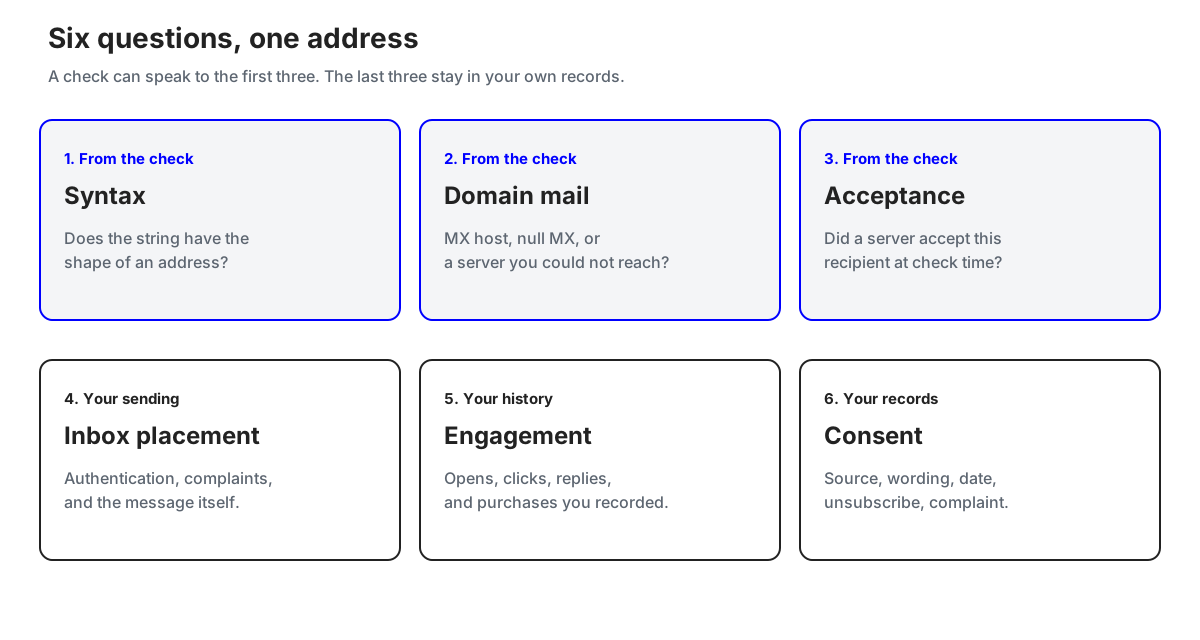
The six questions in the diagram stay in separate fields. A single green label on an export cannot carry syntax, domain policy, recipient acceptance, inbox placement, engagement, and consent at once.
Where MailCheckup fits this job
Use MailCheckup when you want one label set from the review through the import. Syntax runs first. Disposable and role are classifications, not broken syntax. No reachable mail server stays inconclusive. Accept means deliverable. Reject means undeliverable. Accept-everything means catch-all. A full mailbox, a greylist, a block, a timeout, or no clear answer stays out of the invalid pile, as the check-order page describes.
Upload CSV or TXT, or paste addresses. Export CSV, TXT, or XLS for the segment you choose. Unknown and mailbox full can be rechecked without redoing finished rows. Consumed credits stay consumed. A check that never finishes releases its hold. None of that picks Send for you. The permission join, the handoff, and the morning suppression pass still sit with the marketer. The marketing site explains the product. Its sample view does not contact mail servers. The campaign file belongs in the app.
If this file is the one you need to split into segments, verify this campaign list in the MailCheckup app. Read the result labels against the segment rules above before you import anything into the sending platform.
Questions marketers still ask
Should I verify a list I already have permission to mail?
Yes, when you need to know which permitted rows still accepted a recipient check for this send. People leave jobs, mailboxes fill, and domains lapse. Skip the check only on a file small and recent enough that you will handle bounces by hand. Do not skip the suppression join in either case.
Does a deliverable result mean I can send?
It means the server accepted the recipient at check time. Send only if the row is also inside permission and outside suppression, inside a program that still handles authentication, complaints, and unsubscribe. Keep the date on the result. It is not an inbox prediction, and it does not stay true by itself.
What should I do with catch-all addresses on a customer domain?
Leave them out of default Send. Add a row back only with a relationship that does not depend on the probe: a contract, a recent reply, or a purchase on that address. Document the exception. Do not fold catch-all into "mostly valid" to protect a forecast.
Should I delete unknown rows so the file looks finished?
No. Unknown means the check got no clear answer. Deleting it invents certainty and throws away a free result. If the send cannot wait, mail Send and leave Hold unsent. Report both counts.
How often should I run this again?
Before a send that matters, and when the list changed: a large import, a long gap, a bounce spike, or a Hold group you deferred. A weekly newsletter and a quarterly reactivation of old trials do not share an interval. Use the check time on the last handoff. Choose the gap yourself.
Sources
These are the documents relied on for the external claims above. Access date for each: 6 October 2026.
- RFC 5321, Simple Mail Transfer Protocol, sections 2.1, 4.1.1.3, and 4.2.1. https://www.rfc-editor.org/rfc/rfc5321
- RFC 5322, Internet Message Format, section 3.4.1. https://www.rfc-editor.org/rfc/rfc5322
- RFC 1035, Domain names, implementation and specification, section 3.3.9. https://www.rfc-editor.org/rfc/rfc1035
- RFC 7505, Null MX, sections 1, 3, and 4. https://www.rfc-editor.org/rfc/rfc7505
- Google, Email sender guidelines. https://support.google.com/mail/answer/81126