Read the reply class first. Then put the address in one pile: send-eligible, suppress, or hold. A plain accept becomes send-eligible only after your own consent record allows this message. A recipient reject is suppressed. A defer, a greylist, a block, a timeout, or no answer stays on hold. Hold is not a softer word for invalid.
Key takeaways
- An accepted
RCPTin RFC 5321 is a250completion for that transaction. It is not a statement about the inbox. - Decide from the three-digit code. The sentence after the code can be missing, and the standard tells the client not to take its action from that sentence.
- A first digit of 2 completes the command. A first digit of 4 is temporary: try again later, and do not delete the person. A first digit of 5 means do not repeat that exact request in the same sequence. Silence has no digit.
- One accept does not identify a mailbox when the domain accepts every name. That pattern is catch-all.
- A full mailbox is its own state. The standard's storage replies are not "no such user."
- On a MailCheckup result, accept maps to deliverable, reject maps to undeliverable, accept-everything maps to catch-all, a full mailbox maps to mailbox full, and greylist, block, timeout, or no clear answer maps to the unknown family. Unknown is free. Unknown is not invalid. Deliverable is not inbox placement.
What does an SMTP accept actually prove?
SMTP verification, as this page uses the term, means you asked a mail server about a recipient and you kept the reply. The question is small. For this address, at this time, did the server accept the recipient?
RFC 5321, section 3.3, defines a mail transaction as three steps. MAIL names the sender. One or more RCPT commands name recipients. DATA carries the message. If the server accepts a RCPT, it returns 250 OK and stores that forward-path. If the recipient is known not to be a deliverable address, it returns 550, often with text such as "no such user." The same section says other circumstances and other reply codes are possible.
That 250 proves one fact. The server took this forward-path for this transaction. You may start a new request. You may not, from that reply alone, claim a person will see a campaign, that the mailbox is someone's private inbox, or that the same server will accept the address next week.
Which command the reply belongs to
A session contains several replies, and they answer different commands. Only the recipient command can support a mailbox decision.
The opening 220 means the service is ready (section 4.2.2: <domain> Service ready). Many servers accept the TCP connection and delay that greeting until load allows more mail. Section 4.5.3.2.1 tells the client to separate a failed connection from a delayed 220. A slow hello is not a missing person. A 250 on MAIL accepts the reverse-path used for error reports. The server may accept MAIL and only then object to a recipient.
RCPT is the accept or reject people mean by SMTP verification. 251 is also a completion, with a different meaning: the user is not local, and the server will forward. Section 3.4 allows silent forwarding with 250, or a disclosed new address with 251. The server must not assume the client will rewrite its address book. Do not treat 251 as "this string is the final mailbox," and do not overwrite the submitted address from the hint.
354 asks for message content. Section 4.2.1 calls a 3yz code a positive intermediate reply: the command was accepted, and the action waits. 354 is not a finished mailbox result.
A final 250 after the message body is later. Section 6.1 says a 250 OK in response to DATA accepts responsibility to deliver or relay. Section 4.2.5 splits that job: deliver if the mailbox exists, retry transient failures, or notify the sender on a permanent failure. "If the recipient mailbox exists" is the standard's own condition. That accept does not prove the mailbox was identified at RCPT, and it does not name a folder. Section 3.3 also says some servers check the recipient only after the message text arrives, so a check that stops early can record an accept the server has not finished judging.
VRFY is a different command. Section 7.3 says a site that disables it must return 252, not a code that could be confused with successful or unsuccessful verification. The standard text is "Cannot VRFY user, but will accept message and attempt delivery." Filing 252 as a valid mailbox contradicts that rule. Returning 550 for every VRFY is also out of conformance.
What has to stay off the accept
Inbox placement depends on the message you send. Google's email sender guidelines require mail to personal Gmail accounts to use SPF or DKIM, valid forward and reverse DNS, TLS, a spam rate in Postmaster Tools below 0.3%, and RFC 5322 formatting. Senders of more than 5,000 messages a day to Gmail accounts must set up SPF and DKIM and also DMARC. Those rules govern the mail you transmit. A recipient 250 does not satisfy them, and the guideline does not treat recipient acceptance as inbox placement.
Section 6.2 expects mail to be delivered or returned, and it notes that some operators still drop mail without notice when they are highly confident it is seriously fraudulent or inappropriate. Acceptance during a check is not a person seeing the message. The server also did not identify anyone. Consent, the record of how the address was collected and whether this send is allowed, lives in your system. Verification is not permission to send.
The result is time-bound. Section 4.2.1 notes that even some permanent conditions can be corrected later, after a spelling change or an account change, if a person starts a new attempt. Store the check time beside the code.
How should you read an SMTP reply?
Read in order: did a reply arrive, which command it answers, then the first digit. The sentences vendors print will mislead you if you start there. Reply codes named on this page are the ones RFC 5321 defines. They are not a transcript from a MailCheckup check. MailCheckup publishes categories.
Use the code, not the sentence
Section 4.2 says the client must determine its actions only by the reply code, not by the text. The exceptions are the change-of-address codes 251 and 551, and, when you need them, 220, 221, and 421. Any other text, including no text, must be acceptable. Recommended reply text can change with the command.
"Mailbox unavailable" is not a decision. 450 uses that phrase for a busy mailbox or a temporary policy block. 550 uses it for mailbox not found, no access, or a command rejected for policy reasons. Same everyday words. Different first digits. Different piles.
The code list is not frozen. Section 4.2 says a client must handle unlisted codes by the first digit only. An unfamiliar number is not a reason to invent a mailbox story.
What the first digit commits you to
Section 4.2.1 assigns four meanings.
A 2yz positive completion means the requested action finished. On RCPT, that is the accept, and only the accept.
A 3yz positive intermediate reply means the server is waiting. In ordinary SMTP that is 354. Do not export it as a mailbox verdict.
A 4yz transient negative completion means the action did not occur and the condition is temporary. The client should try again. The standard's rule of thumb is that a reply is a 4 when the same command could succeed later with no change in the command and no new implementation on either side. A 4 is not a delete.
A 5yz permanent negative completion means the client should not repeat that exact request in the same sequence. That is the reject class. It says nothing about other addresses on the domain, and it is not the code a timeout would have been.
The second digit is only a hint. x5z is the mail system. x2z is the connection. 421 means the service is closing the channel and may answer any command if the service must shut down. It is a 4 about the session, not a missing person.
Silence is not a reject
A timeout is the client giving up, or a connection that never produced a greeting. There is no first digit.
Section 4.5.3.2 sets minimum waits for a client that is trying to hand off mail: five minutes for the initial 220, five minutes for MAIL, five minutes for RCPT, two minutes for the 354, three minutes during a chunk of message data, and ten minutes for the final 250 after the body. Those floors exist so a late success is not mistaken for failure. They are not a published wait for a MailCheckup check. A shorter verification limit is a property of the check. It does not turn the empty cell into a 550.
If the log is yours, write down the limit you used. Call a dropped connection with no code "no answer." Do not translate a blank spreadsheet cell into a permanent failure because the field was a boolean.
A checklist for one SMTP-style result
Walk these twelve steps on one row before it touches a campaign.

- Copy the address exactly as submitted. Keep a typo suggestion beside the row. Do not replace the submitted address and then describe the new string as the one you checked.
- Write the check time as a timestamp with a timezone. A result with no time cannot be compared with a later one.
- If no reply arrived, because the connection failed, the greeting never came, or the client hit its limit, stop. Class the row timeout or no answer. Leave the code empty. Do not insert
550. - Name the command: greeting,
MAIL,RCPT,DATA, orVRFY. A mailbox decision needs the recipient command. A220, aMAIL250, a354, or a VRFY252does not qualify. - Write the three-digit code from the recipient reply. If you do not know the code, keep the first digit and follow that digit. Do not invent a meaning from the sentence.
- Take the action from the code. Read the sentence only for the section 4.2 exceptions:
251and551when another address is offered, and220,221, or421when you need to see the channel open or close. - If the recipient command completed with a
2, ask whether this domain accepts names that were never assigned. One accept cannot settle that. If it accepts every recipient, class the row accept-everything. RFC 5321 does not define "catch-all." A positive completion for arbitrary local-parts still does not identify one mailbox. - If the first digit is
4, class the row defer. Greylisting is not an RFC 5321 code. It is a habit of using a transient reply so a normal sender waits and tries again. The pile is hold. Do not loop and then call the last450dead. - If the first digit is
5, split before you suppress.552(storage allocation exceeded) is a full mailbox.452is already a4. A recipient550, when the address is known not to be deliverable, is a reject. The same policy refusal on unrelated domains is a session block:550explicitly allows "command rejected for policy reasons." A block is not a stack of missing people. - If the first digit is
3, you are mid-command. Do not finish the row as accept or reject. Class it no clear answer unless you are separately completing a real mail transaction, which is outside this checklist. - Choose one pile. Send-eligible: plain accept, and consent already allows this message. Suppress: recipient reject, or syntax so broken the address never deserved a server call. Hold: accept-everything, full mailbox, defer, greylist, block, timeout, and no answer. A send-eligible row with no consent record stays out of the campaign.
- If MailCheckup checked the address, store the category it assigned and map it with the next table. Do not write an RFC code into that column. A code you did not capture is not a MailCheckup test.
Steps 7 and 9 are where logs usually go wrong. A 250 feels finished, so catch-all domains enter the campaign. A 552 starts with 5, so full mailboxes join the dead-address list.
How do raw outcomes map to MailCheckup categories?
Keep a raw class in your own column when you have a log: accept, reject, accept-everything, mailbox full, defer, block, timeout, no answer. Those words describe an observation. They are not a second product interface.
When MailCheckup ran the check, store its category and stop reconstructing a session it did not give you.
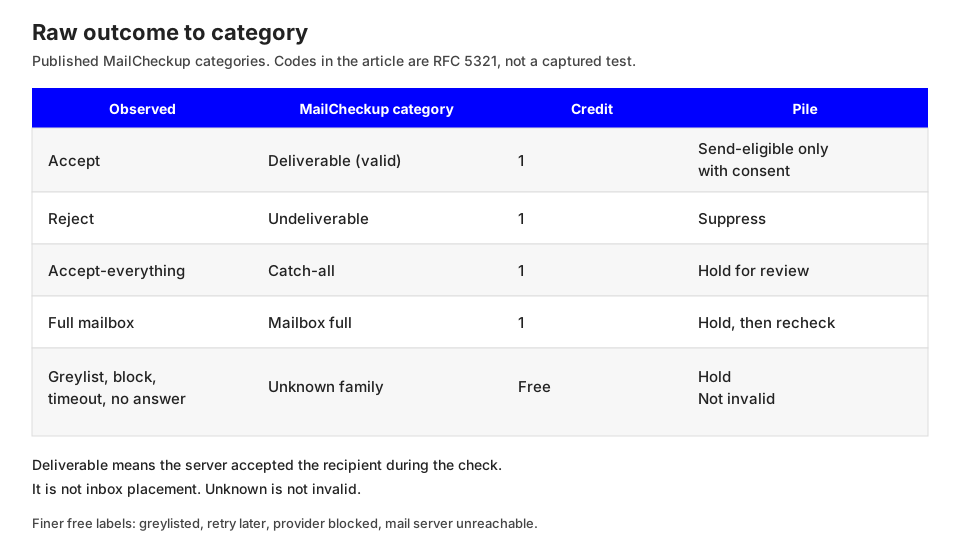
| What you observed | MailCheckup category | Credit when finished | Pile |
|---|---|---|---|
| Accept | Deliverable, also called valid | 1 | Send-eligible only if consent allows it |
| Reject | Undeliverable, grouped with dead and invalid | 1 | Suppress |
| Accept-everything | Catch-all | 1 | Hold for review |
| Full mailbox | Mailbox full | 1 | Hold, then recheck |
| Greylist, or a defer that asks for another try | Greylisted or retry later, unknown family | Free | Hold |
| Block of the check | Provider blocked, unknown family | Free | Hold |
| Timeout, no answer, or a server that cannot be reached | Unknown, or mail server unreachable | Free | Hold |
The last three rows are one family. A report may say unknown, greylisted, retry later, provider blocked, or mail server unreachable. The results guide lists those labels separately. They cost nothing, and they are not invalid. A system error is not an SMTP outcome: the check did not finish, and the credit hold is released. "Not checked" has no finished result yet and stays free until a chargeable result exists. An empty cell is neither unknown nor a reject.
Risky is the summary for disposable, catch-all, role account, and mailbox full. It adds no second charge, and unknown is outside it. Disposable domains and role addresses such as info@ are classifications, not RCPT replies. How MailCheckup orders a check runs them before this step.
Deliverable means the server accepted the recipient during the check. One credit. It is not inbox placement. Intersect it with consent before a send. Missing consent is not a reason to call the row invalid.
Undeliverable, grouped on the results guide with dead and invalid, means the recipient was rejected or the syntax was broken. One credit. Suppress. Broken syntax never needed a server, so do not describe it as an SMTP reject. A 5 says not to repeat that exact request in the same sequence. Other addresses on the domain can still accept. A corrected address later is a new check. The old reject stays suppressed.
Catch-all is not marked deliverable. One credit, inside the risky summary. Hold it. Someone you already write to can stay; a cold address with no other evidence stays out of a confirmed-mailbox extract. The policy lives on the catch-all page. Catch-all is not invalid.
Mailbox full means the mailbox cannot take more mail right now. One credit. Not undeliverable. In a raw log, 452 is transient insufficient storage and 552 is the 5yz storage reply, so a "every 5 is dead" rule files full mailboxes with missing people. Hold them. MailCheckup can recheck mailbox full or unknown without redoing finished rows. A new chargeable finish can use another credit. Saved results stay. Consumed credits are not refunded. Unfinished checks release the hold. Do not write 452 or 552 onto a MailCheckup category you did not capture.
Greylist, block, timeout, and no answer stay in that free family. Unknown versus invalid is the short form: invalid names an address problem, and unknown means the check did not conclude. A 450, a 451 ("error in processing"), a 421, a greylist, a blocked check, a timer, or a missing greeting is not a recipient 550. No mail server, or a server that cannot be reached, is inconclusive for the same reason: there is no recipient reply to read. Retry a 4 later. An immediate repeat often sees the same temporary condition, because the command did not change. A recheck that finishes still unknown stays free. On a MailCheckup webhook, email.unknown is not a delete event.
What should the file process look like before and after?
The checklist is the row rule. The process is what the team does with a file. Stop folding every non-accept into one suppression list.
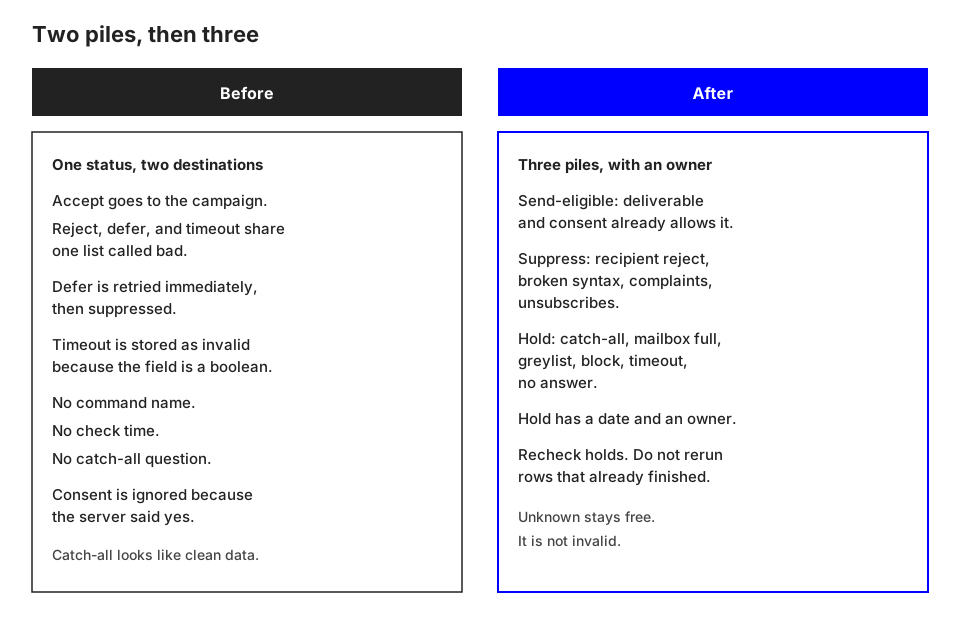
Before: two piles, and a false invalid
A script or a vendor column stores four words: accepted, rejected, deferred, timed out. Accepted rows join the next send. The other three join a list named something like "bad emails," and that list suppresses. Deferred rows are retried immediately until the script quits, and the last failure inherits the suppression. Timeouts are stored as invalid because the CRM field is a boolean. Nobody records which command answered. Nobody records whether an implausible local-part on the same domain was also accepted. The only timestamp is the night the file was exported. Consent is ignored on accepted rows because the server said yes.
Catch-all domains then look like the cleanest data, because every probe returned 250. Full mailboxes, greylists, and session blocks look like dead people. The boolean has already discarded the reason a later recheck would need.
After: three piles, and a written map
If you have your own log, store eight classes: accept, reject, accept-everything, mailbox full, defer, block, timeout, no answer. If MailCheckup ran the check, store its category instead of reconstructing a code.
Send-eligible contains plain accepts that are deliverable, intersected with consent. Deliverable without consent waits. It does not enter the campaign, and it does not enter suppression. You are waiting on permission.
Suppress contains recipient rejects and locally broken syntax, plus complaints and unsubscribes you already honor. SMTP cannot cancel those last two. Unknown must not enter this pile. Catch-all must not enter it. Mailbox full must not enter it.
Hold contains everything else: catch-all, mailbox full, and the unknown family. Each held row has an owner and a next date. Catch-all waits on the policy you wrote for those domains. Mailbox full and unknown wait on a later check. On MailCheckup that later check can cover the held group without rerunning rows that already finished. Do not open a second list just to recheck. Do not clear or delete a list while it is still importing or verifying. Stop first.
Hand the next person six fields: submitted address, check time, raw class or MailCheckup category, pile, consent state from your system of record, and the hold date if there is one. They should see why a row was kept without opening a transcript.
Credits follow the finished category in the table above, not the pile. Duplicates inside one file are stored once and are not billed twice. Spend the next run on holds, not on recipient rejects you already trust, unless the address itself changed. That matches the 5yz rule against repeating an exact permanent failure in the same sequence, and the 4yz rule to try a transient condition again later.
An illustrative file, not a test result
These counts are invented so the piles are easy to see. They are not a MailCheckup export, not a customer file, and not a measured rate.
| Illustrative group | Count | Before | After |
|---|---|---|---|
| Plain accept | 620 | Campaign | Deliverable candidates, still gated by consent |
| Accept on a domain that accepts every name | 80 | Campaign, because the code was 250 | Catch-all, held |
| Recipient reject | 100 | Suppressed as bad | Undeliverable, suppressed |
| Full mailbox | 50 | Suppressed as bad | Mailbox full, held |
| Defer or greylist | 90 | Suppressed after a tight retry | Unknown family, held, no credit |
| Timeout | 40 | Suppressed as bad | Unknown family, held, no credit |
| No answer | 20 | Suppressed as bad | Unknown family, held, no credit |
Before, 700 addresses go to the campaign and 300 are suppressed. After, suppression from this check is 100, hold is 280, and 620 are deliverable candidates still gated by consent. This sketch assigns no consent rate.
As an illustration of the published credit rule only, chargeable finishes are 620 + 100 + 80 + 50 = 850 credits. The 150 unknown-family rows add none. This is not a live list or a bounce rate.
Where do the code and the mailbox part ways?
Three mismatches are constant. Each has a pile. None is fixed by calling the address valid.
A 550 can describe the mailbox or the session. Section 4.2.3 gives three examples for one code: mailbox not found, no access, or the command rejected for policy reasons. A domain that returns 550 for one local-part and 250 for another looks like a recipient reject. The same policy refusal across unrelated domains looks like a block. MailCheckup keeps that split in public categories: a recipient reject is undeliverable and costs one credit; a blocked check is provider blocked, free, and in the unknown family. The site does not publish the test that separates them, and this page does not invent one. With a raw log, hold the rows when the refusal is about the client. With a MailCheckup category, obey the category. 551 ("user not local; please try") is a 5 that also offers another address. Like 251, it is a hint, not an order to rewrite the database.
A 250 on a domain that accepts every local-part is catch-all, not a second confirmation. 552 and 452 are storage replies: hold them as mailbox full, even though 552 is a 5yz code. A 4 (450, 451, 421, or a greylist that uses a transient reply) asks you to wait. Do not suppress it, and do not relabel the last retry as a 5 you never received.
Where does this step sit in a full check?
Recipient acceptance is the last question. On MailCheckup, earlier answers are already settled. Broken syntax is invalid, and a typo suggestion does not rewrite the submitted address. A disposable domain or a role address is a classification, not a syntax error. No mail server, or a server that cannot be reached, is inconclusive, not a confident invalid person. Only then do accept, reject, accept-everything, mailbox full, and no clear answer apply.
Starting at SMTP causes two ordinary mistakes. A broken address gets described as a server failure. A role mailbox that accepts gets described as a personal contact. The order on how MailCheckup orders a check keeps those rows from reaching this checklist under the wrong name. Credits, the risky summary, and the free labels stay on the results guide. This page adds the SMTP reading under those labels, and the file process that keeps unknown out of suppression.
The sample checker on the marketing site does not contact mail servers. A category that depends on a recipient reply comes from a check in the app. A row that has never been checked stays "not checked."
What should you do next?
Mark one recent file with the checklist before you rebuild the campaign. Count how many addresses the old "bad" list would have suppressed that this map puts on hold. That count is yours. It will not match the sketch above.
When you want the categories assigned on a list you already have, run the check in the MailCheckup app. Read the export against the map. Keep consent in your own system. Treat deliverable as acceptance during the check. Leave unknown on hold: it costs nothing, and it is not invalid.
Sources
- J. Klensin, RFC 5321, Simple Mail Transfer Protocol, October 2008. Sections 3.3, 3.4, 4.2, 4.2.1, 4.2.2, 4.2.3, 4.2.5, 4.5.3.2, 6.1, 6.2, and 7.3. Accessed 6 October 2026.
- Google, Email sender guidelines. Requirements for mail to personal Gmail accounts, including the section for more than 5,000 messages a day. Accessed 6 October 2026.
- MailCheckup public pages for category and credit rules: How email verification works, Results guide, Unknown versus invalid, Catch-all email verification. Checked 6 October 2026.