Key takeaways
- Catch-all is a finished classification of domain behavior. A real person can use an address on that domain. The check still did not confirm the individual mailbox.
- Deliverable, unknown, and invalid are different decisions. Risky is a summary label for four result types, not a fifth verdict and not a second fee.
- Keep, review, and suppress are send decisions. Suppress does not delete the person from your system of record. Keep does not merge the row into the deliverable audience.
- Relationship, consent, and source outrank the SMTP reply. An unsubscribe, a complaint, or your suppression list outranks all three.
- Export the catch-all rows, with a stable join key, before any cleanup that removes them from the verification list.
What should you do with a catch-all segment?
Split it by records you already hold. Keep a row only when the next message matches a purpose you stored, and keep that row in its own stream. Review incomplete records. Suppress every other send. Leave the contact in your system of record unless a separate retention rule says otherwise. Any report that separates "the domain accepts every recipient" from "this recipient was accepted" and from "no clear answer" can be run this way.
What does catch-all email detection tell you?
Catch-all email detection is the point where the domain's mail policy, not the local-part, is what came back. The address was syntactically usable. It was not set aside as a disposable service or a role mailbox. The domain can take mail. The recipient step then found that the server accepts recipients in general, rather than confirming this one.
What a catch-all result means stops at that definition: the flag blocks false certainty, and a real person can still use an address on that domain. Catch-all email verification adds the product warning: do not convert the flag into a confirmed valid result, and do not pretend one policy fits a customer and a stranger. This guide starts where those pages stop. It specifies the evidence to store, and which combination of relationship, consent, and source maps to keep, review, or suppress.
RFC 5321 section 4.1.1.3 defines RCPT as the command that names an individual recipient. In section 4.2.2, code 250 means the requested mail action completed, and code 252 means the server cannot verify the user but will accept the message and attempt delivery. The RFC never uses the word catch-all. Section 3.5.3 says a server must not return 250 to VRFY or EXPN unless it has actually verified the address. Accepting a recipient is not that verification. Nothing in this workflow reveals the mailbox behind a catch-all domain. The reply does not contain that fact.
How is catch-all different from deliverable, unknown, and invalid?
Deliverable. The check accepted this recipient and did not classify the domain as accept-everything. Deliverable means the mailbox server accepted the recipient during the check. It does not mean the message will reach the inbox, that a person will read it, or that you may send. After DATA, a positive completion means the server accepts responsibility for delivery if the mailbox exists, for retries, or for a failure notice to the sender (RFC 5321 section 4.2.5). That is not inbox placement. A catch-all row has not shown that the mailbox exists.
Catch-all. The domain accepts every address. The result is not marked deliverable. You have a domain policy, not a confirmed mailbox. The row stays unresolved until your own records resolve the send.
Unknown. The server did not give a clear yes or no: greylist, a block, a timeout, an unreachable server, or a check that did not finish. Unknown is not invalid, and it is not catch-all. Do not clean one with the other's rule.
Invalid or undeliverable. Syntax was broken, or the recipient was rejected. That address stays out of a send. A catch-all row does not say that.
No mail service is a different outcome. RFC 7505 defines a null MX, preference 0 and exchange ".", for a domain that does not accept mail. RFC 1035 section 3.3.9 defines an MX as a preference plus an exchange host. An MX names an exchanger, not a mailbox. No exchanger, or one you cannot reach, is inconclusive. It is not catch-all. Role names such as info@ can be classified before recipient acceptance, so they are not this segment either. Suppression still wins on both.
What does acceptance prove, and what do you record?
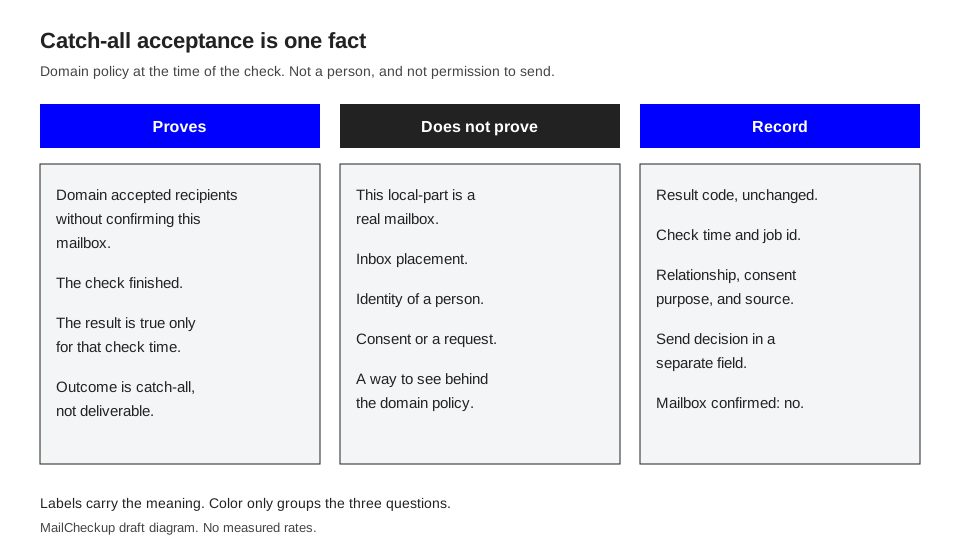
Acceptance is evidence about the server's reply at the time of the check. It is not a dossier on the person. Refuse to compress it into one column called good or bad.
| What you are looking at | What it proves | What it does not prove | What to record |
|---|---|---|---|
| Catch-all classification | The domain accepted recipients without confirming this mailbox. The check finished, and only for that time. | A real mailbox, inbox placement, identity, consent, a later acceptance, or any view behind the policy. | Code, check time, domain, job id, and catch-all rather than deliverable. |
| Deliverable on a different row | That server accepted that recipient, and the result was not catch-all. | Inbox placement, consent, or anything about neighboring catch-all rows. | The same fields. Do not copy this code onto catch-all rows that share a domain. |
| Recipient rejected, or syntax invalid | The address was refused, or it was not usable. | Why another row on that domain was catch-all. | Code, time, and the submitted address. Do not rewrite it from a suggestion. |
| Unknown, greylist, block, timeout, or unreachable server | There was no clear recipient answer. | Invalid, and catch-all. | Code, time, and "not a send decision yet." Keep it out of the catch-all file. |
| A reply, order, or other action you already attribute to this address | Someone or some system using that address dealt with you. This is relationship evidence, not an SMTP proof. | That the verification server confirmed the mailbox, or that every future message will arrive. | Source system, event type, event time, and the identifier you trust for the join. |
| A consent, request, or unsubscribe record | What you already believe you may send, or must not send, and for which purpose. | That SMTP acceptance created the permission. Verification is not consent. | Purpose, time, source of the record, and whether suppression or a complaint overrides it. |
| The collection source | How the address entered: your form, your product, an inbound message, a partner file, a purchase, an append, or a guess. | That the source was appropriate, accurate, or still fresh. The SMTP reply does not repair a bad source. | Source name, collection date, and whether the row joins to a person or account. |
Store the catch-all code and the timestamp on the row. A later change in domain policy does not rewrite that check. The line does not say a person created the mailbox, that the mailbox can store mail, or that a filter will pass your message. It does not say who they are, or that they asked to hear from you. Gmail's sender guidelines say to send email only to people who want to get messages from you, and to give recipients an easy way to unsubscribe. A positive recipient reply is neither of those things.
Do not try to see through the policy. Once the domain accepts recipients it has not individually confirmed, the reply does not identify which local-parts are real. No step here reveals the mailbox. Record "mailbox not confirmed" on the row. A reply, an order, a consent record, and a source are facts you already hold. The domain's yes does not strengthen them.
Why do both blanket moves fail?
Deleting the segment throws away relationship evidence so a report looks tidy. A customer and a guessed stranger can share a catch-all domain. The result code does not say which is which. Delete the segment and you delete both.
You also lose the audit. "The domain was catch-all" does not explain a missing invoice if the row, the check time, and the decision are gone. Domain policy does not cancel an order. Drop people from the send file when you have decided not to mail them. Keep the account and the suppression state. Copy the decision. Do not destroy the account to make the two systems match.
Treating the segment as valid hides a limit you already paid to see. Once those rows sit in the valid export, a map, a client deck, and any "send to valid" prompt will treat them as confirmed recipients. A domain that accepts every recipient may later bounce, drop, or deliver. You do not know which address will do which, and this guide does not invent a rate for it. The merge also washes source. A guessed address and a customer's address then share a label other teams read as safe. RFC 5322 section 3.4.1 defines an addr-spec as syntax: a local-part at a domain. Matching that syntax, even on a catch-all domain, is not agreement to be mailed. Promoting catch-all rows because the deliverable count looks small is the same mistake with a quota attached.
Which rows do you keep, review, or suppress?
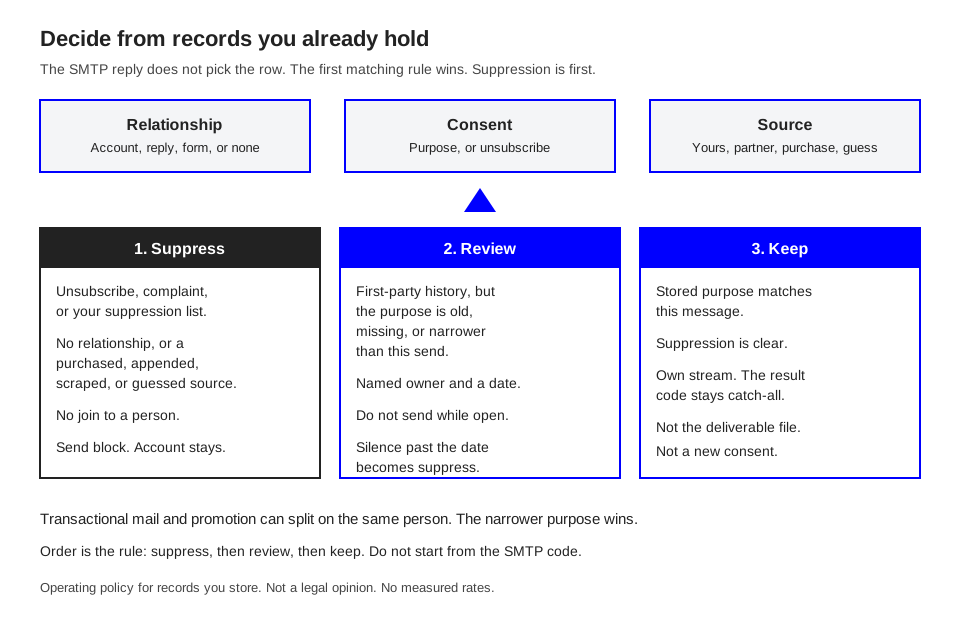
Use three inputs you already store. Do not derive them from the SMTP reply.
Relationship is what this address has done with you. Consent is the purpose you stored, plus unsubscribe, complaint, and suppression. The matrix operates those records. It is not a legal opinion. A missing record stays missing. Source is how the address entered: your form, product, invoice, or inbound message, or a partner file, purchase, append, or guess.
The first matching row wins. Suppression is first on purpose.
| Relationship | Consent record | Source | Decision | What keep allows |
|---|---|---|---|---|
| Any, including a current customer | Unsubscribe, complaint, or your suppression list | Any | Suppress | Nothing. The SMTP class does not lift a suppression. |
| Active account, open contract, or a notice you still owe | Record covers this message | Your product, form, invoice, or ticket | Keep | That purpose only, in a catch-all stream. |
| Active account or open contract | Transactional relationship only. No promotional consent. | First-party | Split | Service notices you already owe. No newsletter and no other promotion. |
| A recent reply, or a requested step tied to this address | The request matches this send | Inbound from them, or your form | Keep | That thread or that purpose. Do not widen it because the domain accepted mail. |
| Known person, quiet under your own freshness rule | Missing, unclear, or an old purpose | First-party history | Review | No send until you can name a current purpose. |
| One event: webinar, download, badge scan, or trial | The stored text of what they accepted, if you have it | Your form | Review | Keep only when the next message is that text. Otherwise suppress. |
| An introduction | Written permission that names you and the kind of message | A partner, not your form | Review | Suppress when the note does not cover this send. |
| No relationship you can show | None | Purchased, rented, appended, scraped, or guessed | Suppress | Nothing. Acceptance does not promote this source. |
| No relationship | None | A public address copied into a file | Suppress for any blast | A personal note you would have sent without a list is a different workflow. Do not pour the row into a segment. |
| No match to a person or account | Unknown | Any file, including a bare CSV | Suppress for sending | Try the join once. If it fails, do not send. |
| Your own routing address | Internal operations | Your organization | Keep only that internal route | Not a prospect list and not a customer result. |
Freshness is yours. Write down the period your policy already uses, and apply it on the review row. An illustrative example, such as twelve months, is not a measured threshold and not a number from the mail standards cited here.
How do you handle a customer on a catch-all domain?
Keep the relationship and keep the result code. The account, the contract, or the ticket is why you write, not the SMTP reply. Name the purpose and send from a stream that still shows catch-all. A password reset or a past-due notice can still fail. Use a second channel the account already gave you. That is a fallback for a message you owe, not a search for another local-part. This check does not say which local-parts exist.
How do you handle a stranger, or a split between consent and relationship?
Suppress a stranger. A firstname.lastname pattern is a guess until a first-party record ties it to a request. "Keep it just in case" is still suppress until the relationship and the permission exist outside the verification file.
When consent and relationship disagree, the narrower one wins. A customer with no promotional consent can get the invoice and stays off the launch mail. A webinar registrant gets the session mail the form described and stays off unrelated offers. Write the purpose in a field that is not the result code. "Keep" with no purpose becomes "send everything" on the next import.
How do you apply the matrix without losing the list?
Work on a copy. Keep the original export.
- Finish the check. If a job is still importing or verifying, stop it before you remove rows. On MailCheckup that removal is refused until you stop.
- Export catch-all alone: address, result code, check time, and the stable id you uploaded. Row order is not an id.
- Join on that id. Use the address as the key only when it really is your key. Decide how duplicates match before you delete anything.
- Copy relationship, consent purpose, consent time, suppression, and source. Leave result_code alone. Write keep, review, or suppress in a different column.
- Apply the matrix from the top. Suppression first. Unsettled rows are review, and review means do not send.
- Name an owner and a due date. When the date passes with no decision, suppress the send. Reopen later if new evidence shows up.
- The send file holds deliverable rows that pass the same consent tests, plus catch-all rows marked keep for this purpose. Unknown, undeliverable, and review stay out.
- Store the decision, the purpose, the date, and the owner. Change that column when the rule changes. Do not overwrite the result code.
The results guide separates what the check found from the next step you choose. Keep that split so a later policy change does not rewrite the code.
Name the sending audience for the limit, for example "catch-all, customers, invoices." If the name says valid, people will treat it as valid. Count complaints on that stream alone. If they exceed what you accept on the deliverable stream, stop the stream and return the rows to review. In the customer system, suppress is a send block with a reason. The account stays. A newer catch-all result does not lift the block, and a newer deliverable result is still not consent. Review is a short queue: the address, the check time, the source, the last real interaction, and the consent text. The reviewer picks keep-for-purpose or suppress. If the queue is mostly purchased data, suppress the source instead of debating rows.
What should every catch-all row store?
| Field | Why it exists |
|---|---|
| Submitted address, unchanged. | |
| contact_id or account_id | Join key. Empty means unmatched, so the send is suppressed. |
| result_code | Catch-all, left as catch-all. |
| checked_at | When the check was true. |
| job_id or list_id | Which run, so later imports do not mix checks. |
| mailbox_confirmed | No. Stops a later note from upgrading the row. |
| relationship | Active, owed notice, recent inbound, cold first-party, none, or internal. |
| consent_purpose | Purpose text, or none. |
| suppression | Unsubscribe, complaint, list hit, or none. |
| source | System and collection type. |
| decision | Keep, review, or suppress. |
| decision_purpose | Required on keep. |
| decision_at and decision_owner | Audit of who applied the rule. |
Skip a score column. A number implies a precision the acceptance reply does not have. If a vendor supplies one, store it as a comment and do not let it override the matrix.
Where does a MailCheckup catch-all result sit?
These are the published rules on the results guide and the MCP server page. They do not add a hidden mailbox fact.
A finished catch-all result costs one credit, the same as deliverable, undeliverable, disposable, role account, and mailbox full. Unknown, retry later, greylisted, an unreachable mail server, a provider block, and a system error cost nothing. Not checked is free until a chargeable result exists. Catch-all is not marked deliverable: the domain accepted every address, which is not the same reply as accepting this recipient.
Risky groups disposable, catch-all, role account, and mailbox full. It is not a separate charge, so do not add it on top of those parts. Filter catch_all for this decision. Disposable, role, and mailbox full do not use this matrix.
Duplicates inside one file are stored once and are not billed twice. Consumed credits are not refunded when you suppress the row. The credit paid for a finished answer.
List and export segments include catch_all beside deliverable, undeliverable, disposable, role_account, mailbox_full, risky, unknown, and not_checked. On the MCP server, export_list emails the download link. The link is not in the tool result. The event email.catch_all carries the address, the code, the list id, and the list name. It is not a delete instruction. email.unknown is free and is not a delete event either.
The published recheck path names unknown or mailbox full, and it leaves finished rows alone. Catch-all is not on that list. Another finished check can cost another credit, and the published model does not say a second pass reveals the mailbox.
What does keep-valid-only do to catch-all rows?
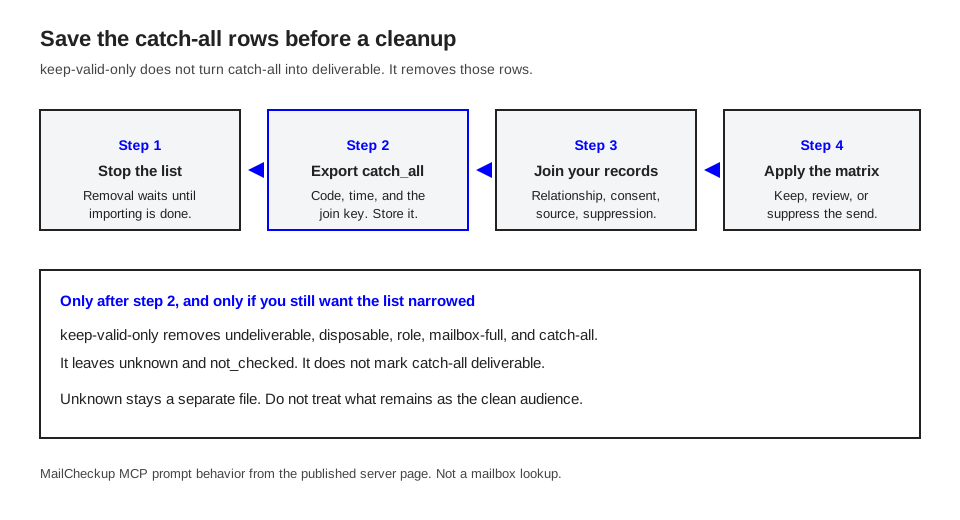
On the MailCheckup MCP server, keep-valid-only takes a list id and runs only after the list is stopped. It removes undeliverable, disposable, role, mailbox-full, and catch-all. It leaves unknown and not_checked.
The prompt does not mark catch-all as deliverable. It removes the rows. Export them first if the matrix still needs them. It will not run while the list is importing or verifying, so stop first. Stopping releases unused holds. Credits already consumed stay consumed. Unknown stays, because it was not a clear billed answer. Do not paste catch-all rows back into the deliverable segment. The export was the copy that mattered.
When an agent is in the loop, export or page catch_all first and store that file with the job id. Export unknown separately. Only then run keep-valid-only, if you still want the verification list narrowed. The prompt does not know your customers, your consent text, or your suppression list. pull-valid-results pages deliverable only. Those rows were accepted as recipients, not placed in an inbox, and they do not include catch-all. Do not relabel the missing rows as invalid.
How does one illustrative list break apart?
Every count in this section is illustrative. None of it is a MailCheckup benchmark, a customer measurement, or a bounce rate. Chargeable rows use the published rule of one credit each. Unknown is free. Repeat the arithmetic on a real file.
Illustrative list: 2,000 unique addresses, one check each, no duplicates.
| Illustrative result | Rows | Illustrative credits |
|---|---|---|
| Deliverable | 1,100 | 1,100 |
| Undeliverable | 200 | 200 |
| Catch-all | 400 | 400 |
| Disposable | 40 | 40 |
| Role account | 20 | 20 |
| Mailbox full | 40 | 40 |
| Unknown | 200 | 0 |
| Total | 2,000 | 1,800 |
Risky, using the published grouping, is disposable plus catch-all plus role plus mailbox full: 40 + 400 + 20 + 40 = 500 illustrative rows. Those 500 already sit inside the 1,800. Adding 500 again invents a fee the price list does not charge.
Join only the 400 illustrative catch-all rows. This mix is also made up.
| Illustrative situation | Rows | Decision | Promo file |
|---|---|---|---|
| Active customers whose promo purpose is already consented | 90 | Keep | Include, catch-all stream |
| Active customers, transactional mail only | 50 | Split | Exclude from the promo. Keep for invoices. |
| First-party, purpose unclear or stale under your rule | 70 | Review | Exclude until a person decides |
| Your form, and the stored purpose is this promo | 40 | Keep | Include, catch-all stream |
| Purchased, appended, or guessed, no relationship | 120 | Suppress | Exclude |
| No join to a person or account | 30 | Suppress | Exclude |
| Catch-all total | 400 | 130 included |
The illustrative promo file gains 130 catch-all rows, not 400, and only beside deliverable rows that pass the same consent test. It does not gain the 200 unknown rows or the 120 purchased rows. Deleting all 400 would drop the consented customers. Marking all 400 valid would trust the purchased and unmatched rows. The 400 catch-all credits stay consumed after you suppress: a finished answer stays billed. keep-valid-only, run after the export, removes those 400 from the verification list and leaves the 200 unknown rows. Your real file will keep more when it is mostly customers, and suppress more when it was bought. The procedure does not change.
What fails when the rule is automated?
Merging on the word accepted. Catch-all has to fail any rule that marks every yes as valid.
Running keep-valid-only before the export. Catch-all rows leave. Unknown stays. What remains is not a clean file, and the catch-all customers are gone from that list.
Deleting the risky total. Disposable, role, mailbox full, and catch-all do not share a next step.
Overwriting result_code with the decision. The next person reads "keep" as a confirmed mailbox.
Asking an agent to find the real mailbox. The MCP server will not find or guess addresses. There is no find-email tool. Hand it the export and these rules.
What does this decision leave to the shorter pages?
The explainer defines the flag. The product page says to keep the flag visible and choose a policy. This guide is that policy: what acceptance proves, what you record, and how relationship, consent, and source pick keep, review, or suppress. If a report collapses "domain accepts every recipient" and "this recipient was accepted" into one valid bucket, map or replace the export before you borrow the matrix.
Questions list owners ask
Does a catch-all result mean the mailbox exists?
No. It means the domain accepted recipients without confirming this mailbox. Someone you already know may use the address. The check did not establish that. Leave the code as catch-all, and keep or suppress from your own records.
Should catch-all rows be deleted from the CRM?
No. Block the send, or keep a named purpose, and store that decision beside the original code. Delete a CRM record only under your retention rule, not because a domain accepts every recipient.
Can a later check reveal the mailbox?
Not as a fact this result contains. A later check reports the policy you meet then. It does not open the earlier acceptance, and this guide does not offer a method that identifies the individual mailbox on a catch-all domain.
Does unknown use this same matrix?
No. Unknown means the check did not answer. Park it for a later recheck or a separate review. Do not suppress it as if it had been rejected, and do not keep it as if it were a catch-all row with a relationship.
What to do with the segment you have open
Export the catch-all rows before anyone removes them. Join relationship, consent, and source. Apply the matrix from the top, suppression first, and write the decision in its own column. Leave unknown in its own file.
Then check the codes against the file in your hand, using the results guide, so catch-all stays out of the deliverable column and the risky total is not counted as a second bill. If the list is in MailCheckup, that export comes from the app. The guide is what keeps the next file honest.
Sources
The product-truth registry and the published MailCheckup pages were checked on 6 October 2026. RFC and Gmail citations name the public texts below.
- RFC 5321, Simple Mail Transfer Protocol, sections 3.5.3, 4.1.1.3, 4.2.2, and 4.2.5. https://www.rfc-editor.org/rfc/rfc5321
- RFC 5322, Internet Message Format, section 3.4.1. https://www.rfc-editor.org/rfc/rfc5322
- RFC 1035, Domain Names, section 3.3.9, MX RDATA. https://www.rfc-editor.org/rfc/rfc1035
- RFC 7505, A "Null MX" No Service Resource Record. https://www.rfc-editor.org/rfc/rfc7505
- Gmail sender guidelines, checked 6 October 2026: send email only to people who want to get messages from you, and give recipients an easy way to unsubscribe. https://support.google.com/mail/answer/81126
- MailCheckup results guide and MCP server page, as recorded in the product truth registry. https://mailcheckup.net/results-guide and https://mailcheckup.net/mcp